Grid - Export Options
Supported export file types
The following file types are supported when exporting data from grid:
- Microsoft Excel (.xlsx, but not .xls)
- CSV (delimiter can be defined)
Data export Options
When exporting data to file from grid, the following options are possible:
- Exporting all data from grid
- Exporting selected data (rows) only
The folowing data export options applied to all supported file types.
File export options in grid
The file export capabilities for grid are accessible with buttons, which are located at the upper-right corner of the grid.
The following picture below shows these buttons.

When click is made on export button (based on desired file type format), the dropdown menu for this particular button opens with the following options to select:
- Export all data
- Export selected rows
Example of dropdown menu for PDF export button:
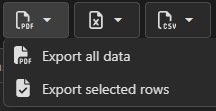
When desired option is chosen, then exporting process starts.
When processing on the backend side is finished, file saving dialog window appears to save created file on desired storage location.